Alexa Device Limit Checker
Estimate practical Alexa account load, app clutter, direct WiFi client pressure, room grouping density, routine pressure, camera feed strain, and whether bridge-backed devices should be split across hubs.
📌Smart Home Presets
🏠Account, Room, and App Objects
🔌Smart Devices and Connection Split
Capacity Check Results
Load Breakdown
📊Device and Spec Comparison Grid
📘Reference Tables
| Planning area | Comfort target | Watch zone | Pressure signal |
|---|---|---|---|
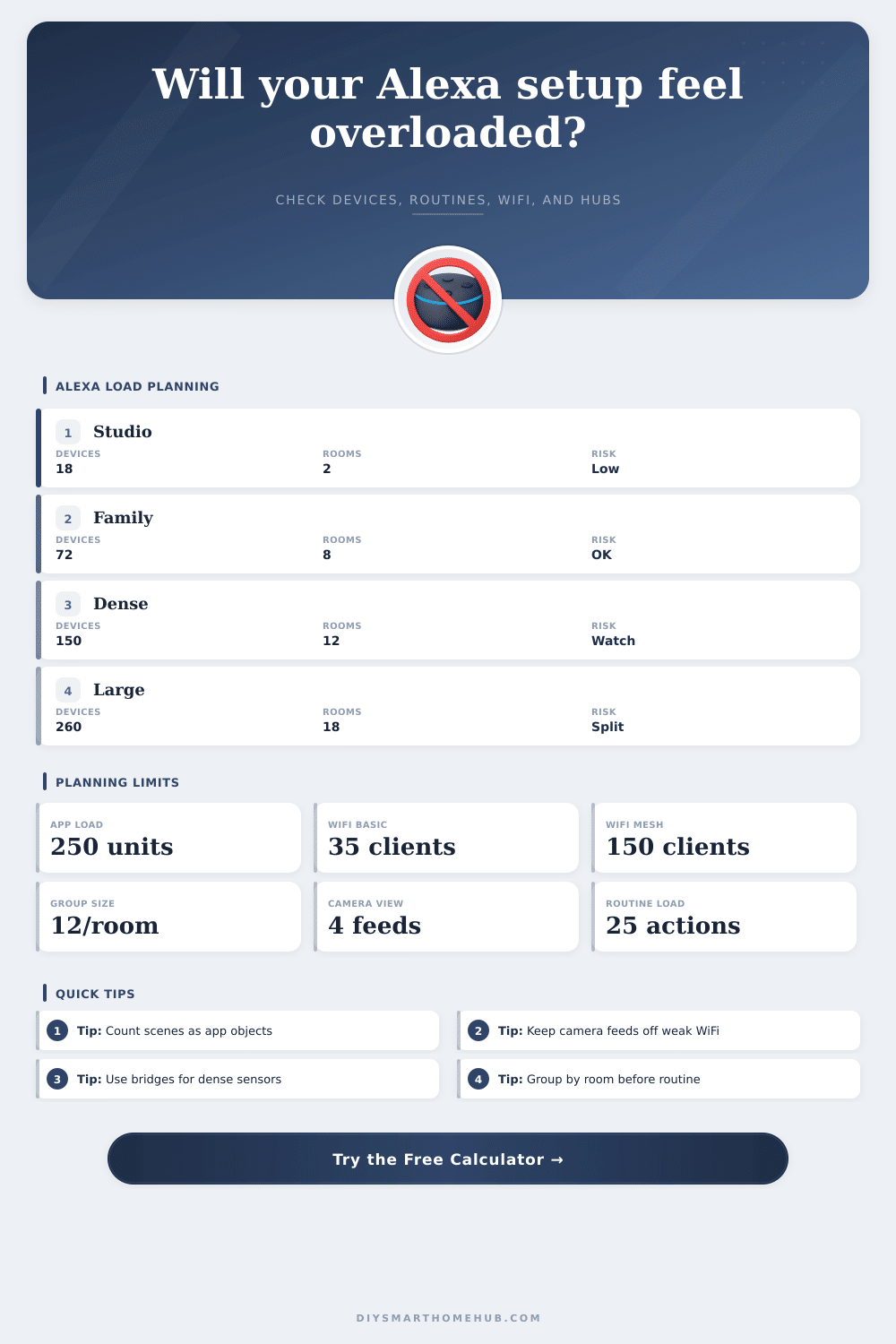
| Alexa account/app objects | Up to 250 load units | 250 to 350 units | Long device lists, duplicate names, slow scanning |
| Direct WiFi IoT clients | Under router comfort target | 100% to 130% of target | 2.4 GHz congestion, delayed commands, camera stalls |
| Per-room grouping | Up to 12 smart endpoints per room | 12 to 18 per room | Voice ambiguity and overloaded room groups |
| Routine pressure | Under 25 weighted actions | 25 to 45 weighted actions | Harder debugging and slower chained automations |
| Device category | Alexa object effect | Network effect | Group/routine effect |
|---|---|---|---|
| Echo speaker or display | Registered account device plus room target | Direct WiFi client | Improves room control but adds voice routing paths |
| Smart bulb or light strip | Usually one controllable endpoint | WiFi client or bridge endpoint | Often included in groups, scenes, and routines |
| Plug, switch, or outlet | One endpoint, sometimes with energy sensor | Often direct WiFi unless bridge-backed | Common routine action and voice target |
| Sensor or button | Lighter app object but frequent trigger source | Best kept bridge-backed when dense | Can multiply routine branches quickly |
| Camera or video doorbell | Heavy endpoint in app and display flows | High bandwidth direct network load | Live feed routines and announcements add pressure |
| Preset | Approx devices | Rooms | Expected pressure |
|---|---|---|---|
| Studio Starter | 18 smart endpoints | 2 rooms | Low app load, simple WiFi load |
| Family Home | 74 smart endpoints | 9 rooms | Balanced if groups are tidy |
| Lighting Heavy | 114 smart endpoints | 12 rooms | Bridge split matters more than app count |
| Estate Split | 290 smart endpoints | 22 rooms | Needs deliberate hub and naming structure |
| Connection split | Best fit | Watch count | Capacity signal |
|---|---|---|---|
| Direct WiFi | Few plugs, cameras, displays, and appliances | 35 to 75 clients on ordinary routers | Router client target is the limit |
| Bridge-backed lights | Rooms with many bulbs and scenes | 32 to 80 endpoints per bridge | Bridge endpoint target is the limit |
| Sensor hub or mesh | Many small battery sensors | 50 to 120 endpoints per fabric | Trigger density is the limit |
| Mixed Matter or Thread | Local control with multiple border routers | Depends on fabric and app layout | Fabric organization is the limit |
🔧Practical Capacity Tips
Because it’s the future, you begin with a smart bulb in your hall and an Echo Dot in the kitchen. A half year later, there are three competing hubs jockeying for power, a mesh of Zigbee sensors, two video doorbells, and a thermostat that argue with you. The app interface has gone from a control panel into a messy tangle. At that point, the discussion shift from “what will work?” to “what won’t I lose patience with?”
Most users reach a limit not when Alexa fills its cloud storage, but when their app get too cluttered to scan quickly or their local network chokes. Instead of just counting boxes, device count above breaks this chaos into smaller, more manageable loads. It divides physical hardware from logical overhead that can actualy slow things down.
How to Organize Your Smart Home
A motion sensor may be lightweight, and typically it is. But ten of them triggering complex routines every hour start adding up in background processing. By separating out devices into network clients (which eat bandwidth like candy) and app load units (which barely whisper to your router), the calculator help you see where that weight sits. This understanding is important because when commands start lagging, knowing the difference can prevent you from blaming the wrong layer.
Begin with your approach to grouping things around the room. Grouping by physical location seem natural for voice control. However, this can be confusing if names start to overlap. Twelve endpoints all in the living room? You’re in that grey area of identical-ish device name confusion, and Alexa may pause before responding. How does that impact clarity? The page’s reference table explain it well: The denser an area is with endpoints, the fuzzier the responses will be. This is not necessarily because the hardware are scattered throughout your home; just make sure similar devices stays closely grouped. A neat setup result in quicker automations and less-confused voice assistants.
Or how about the difference between direct WiFi and bridge-backed protocols such as Z-Wave or Zigbee? That’s frequently the biggest eye-opener for first-time smart homeowners. They think their new router will simply work with anything, but budget routers tend to choke beyond thirty to fifty IoT devices, especially if those IoT devices is cameras uploading video. The more bulbs, plugs and Echos you have connecting directly to WiFi, the more that adds up. Putting dense clusters of lights behind a dedicated bridge or hub relieve huge amounts of pressure on your main network. This little change can save your movie night from buffering doorbell notifications.
Next up are routines. They’re where things get complicated fast. Something like playing music, adjusting the thermostat, or turning on lights sounds easy enough, right? Until it happen 50 times a day vying against other automations. The planner take into account how many actions there is to perform and lets you identify when one routine is taking on too much of workload. Often breaking out long chains into smaller logical steps will increase reliability far better than upgrading to faster hardware. Convenience versus stability are a fair trade-off in home automation every time.
A second subtle overhead is voice profiles. The more recognizable voices you have in the mix, the more the system must parse out which was who saying what and when. While that’s not necessarily a bandwidth problem, it increase the cognitive load on local processing units. If you add several family members, you might get your Echo devices confused about commands. If that happens, it may be time to simplify your routines or the names you use.
None of this is meant to remove technology from your home, but to organize it so that it works for you. If its structure allows for it, a two-hundred device home might feel lighter than a fifty-device one. Run the calculations until you hit a breaking point where something becomes an everyday annoyance. Leave the lights on the bridge. Keep the cameras on good wifi.
You should of don’t make your routines too complex or you’ll need to debug them at 2 AM when everything falls apart. That’s the difference between livig in a tech project and having a home technology feature.