Tablet Wall Mount Viewing Angle Calculator
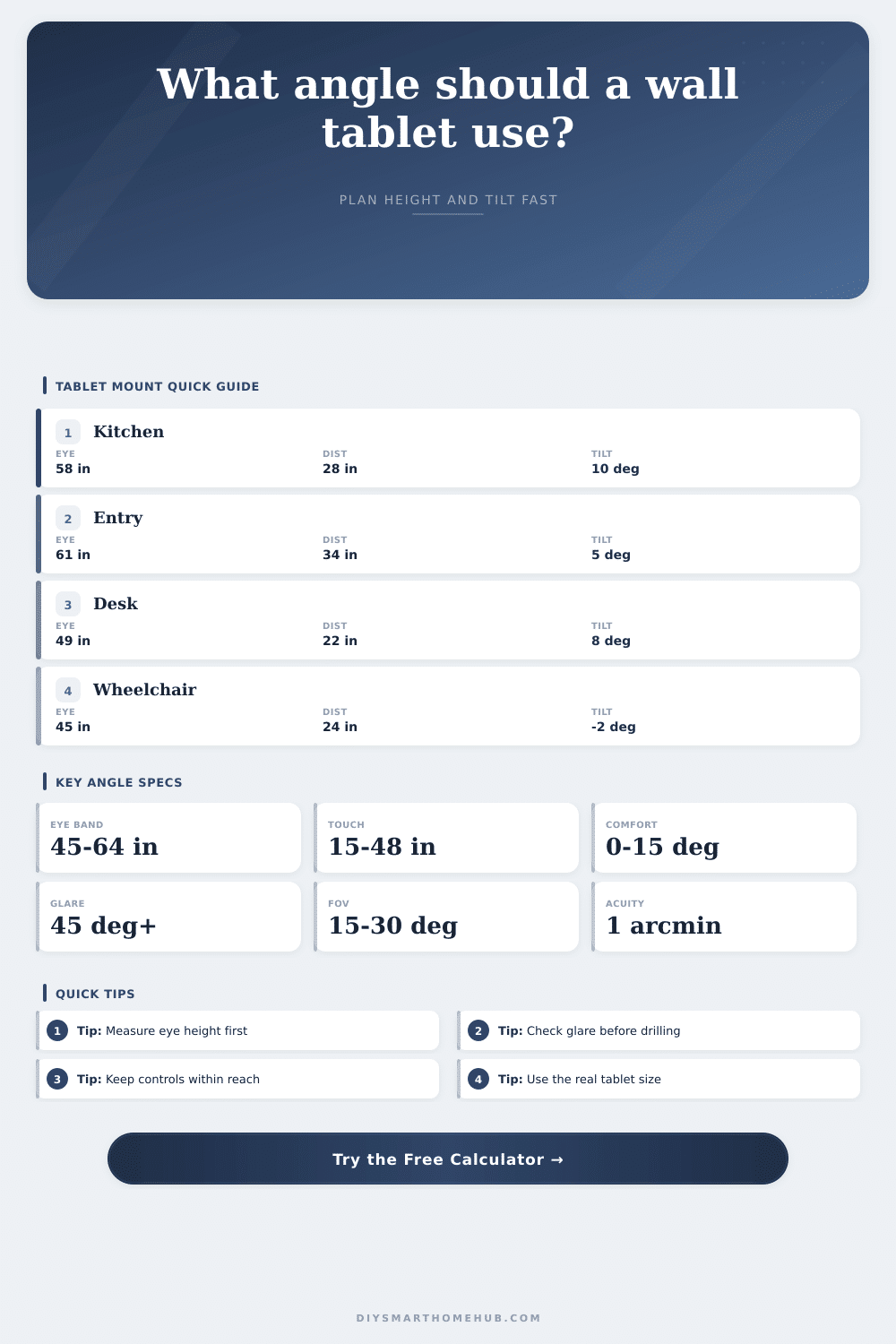
Check wall tablet center height, eye height, viewing distance, screen size, line-of-sight angle, tilt, glare reflection angle, and touch reach before fixing the mount.
Formula breakdown
| Use case | Horizontal FOV | Vertical sight angle | Typical distance | Planning signal |
|---|---|---|---|---|
| Touch control panel | 22° to 32° | -10° to 5° | 18 to 30 in | Prioritize reach and readable controls. |
| Kitchen recipe tablet | 18° to 26° | -10° to 0° | 24 to 36 in | Works well slightly below standing eye height. |
| Entry status panel | 14° to 22° | -5° to 8° | 30 to 48 in | Glance use can mount a little higher. |
| Seated desk panel | 20° to 30° | -12° to 5° | 18 to 28 in | Lower eye height changes the tilt direction. |
| Family dashboard | 12° to 20° | -5° to 10° | 42 to 72 in | Larger screens stay readable across a room. |
| Tablet class | Diagonal | Aspect | Approx screen width | Approx screen height |
|---|---|---|---|---|
| Compact wall remote | 8 in | 16:10 | 6.8 in | 4.2 in |
| Standard tablet | 10.9 in | 4:3 | 8.7 in | 6.5 in |
| Wide control display | 11 in | 16:10 | 9.3 in | 5.8 in |
| Large pro tablet | 12.9 in | 4:3 | 10.3 in | 7.7 in |
| Family dashboard | 15.6 in | 16:9 | 13.6 in | 7.6 in |
Drill a hole in your drywall and slide in an anchor. Install the tablet mount and it feel strong enough. You hang up your tablet. Then you notice strain. Your eyes strain.
Since the screen is mounted to low, you have to awkwardy shrug your shoulders to peek down into those lower corner. Or perhaps it’s mounted too high, forcing you to crane your neck up. This happen when you treat a screen like a painting, hanging it at eye level regardless of who is watching it. But a tablet hanging on a wall isn’t a piece of art; it’s a tool, one demanding comfort more then looks.
How to Hang Your Tablet for Comfort
Without having to guess what the screen’s going to do ahead of time with a drill, the calculator takes care of all that geometry. First you input your own eye height, which accounts for difference between shorter and taller people. For example, someone five foot four may mount their tablet at forty-eight inches and love it, while someone five foot ten need to bend their neck painfully just to see anything. That way, the tool can work from there to get you the correct line-of-sight angle, with that bit of a downward glance for comfort over time.
Fatigue sets in fast if you look up; looking straight on isn’t usually right in real kitchen or hallway. The next thing is the viewing distance: How far from the screen do you sit? The smaller the screen appear while you are watching it, the farther away you must sit. So when calculating things, you take into account not only the horizontal field of view, but also standard readability limits.
The higher the pixel density (and therefore the higher the resolution), the closer you can get without seeing individual pixels. Lower resolution screens requires more distance to appear sharp. Lower resolution screens require more space before they’re readable. So basically you want to measure not inches, but how clear the screen looks to you. And that depends off the resolution of your tablet.
The other big problem with gloss screens, especially in tablets which are wall-mounted, is the glare. Glossy screens acts like mirrors, reflecting anything nearby: windows, overhead lights, etc. When this reflection happen at just the right angle, it bounces straight back into your eyes. By knowing the location of lights & windows around your room, the tool calculates the likely path of such a glare. It returns a number called the “separation angle” indicating whether the glare would be blinding. Moving the tablet a couple inches to the left/right often breaks the reflection path entirely. Light physics dont care about your design aesthetic, so measure twice.
If you’re going to use the thing, then, besides the viewing angle, also consider how easy it will be to touch. Yes: Touch Reach. You know what happens when people install screens high? Because they want to keep them away from little hands. Then the grownups has no hope of touching anything at the top except by climbing on a step stool. So this calculator looks at your arm length and shoulder height to see if the screen is inside what it calls a Comfortable Arm-Reach Zone. That is the vertical band where tapping will be reliable, neither too low nor too high (it also flags screens where critical controls are above that band). No more frustration when you’ve got a pot of boiling water in one hand and need to reach up for the button with the other.
And finally, think tilt: With most wall mounts, the tablet can be tilted ever-so-slightly forward or backward. Positive tilt points the upper part of the screen downward toward the user. If the screen is mounted above eye level, this help balance the upward viewing angle. It also makes the screen less reflective by angling it away from overhead lights. The calculator tells you how much to tilt depending on your situation. This ensures you are looking at the screen straight on to minimize glare and distortions for a better view.
Wall tablets are more about making technology dissapears into the workflow, less about locating studs. The angles matter, get those correct, and the screen vanishes from sight; get them wrong, and it’s now in the way. Measure your eye level, consider where the light comes from, and then choose the drill bit size that feels right based off those numbers. When it doesn’t occur to you at all, that’s the moment you know you would of got it right.