Smart Display Kitchen Mount Height Calculator
Estimate smart display screen center height from counter height, eye height, viewing distance, touch reach, screen size, and backsplash clearance before choosing a kitchen mount position.
Formula breakdown
| Check | Formula | Inputs used | Planning meaning |
|---|---|---|---|
| Screen dimensions | height = diagonal x ratio height / sqrt(width ratio^2 + height ratio^2) | Diagonal, aspect ratio | Finds actual physical screen height for top and bottom edges. |
| Screen center height | screen center height = counter height + screen center above counter | Counter height, center offset | Places the display center from the finished floor. |
| Viewing angle | atan((screen center height - eye height) / viewing distance) | Eye height, center height, distance | Negative means the screen center is below the viewer's eyes. |
| Target center | eye height + viewing distance x tan(target vertical angle) | Eye height, distance, target angle | Solves the mount height needed for a chosen viewing angle. |
| Touch reach | sqrt(arm reach^2 - touch setback^2), then overlap with screen height | Reach, setback, pivot, screen top and bottom | Estimates how much of the display is touchable from the chosen stance. |
| Backsplash clearance | min(screen bottom above counter, backsplash height - screen top above counter) | Screen height, center, backsplash limit | Checks splash gap below and cabinet or shelf clearance above. |
| Scenario | Display | Center height | Viewing angle | Reach | Clearance |
|---|
| Mount style | Typical center height | Counter relation | Best display size | Touch behavior |
|---|---|---|---|---|
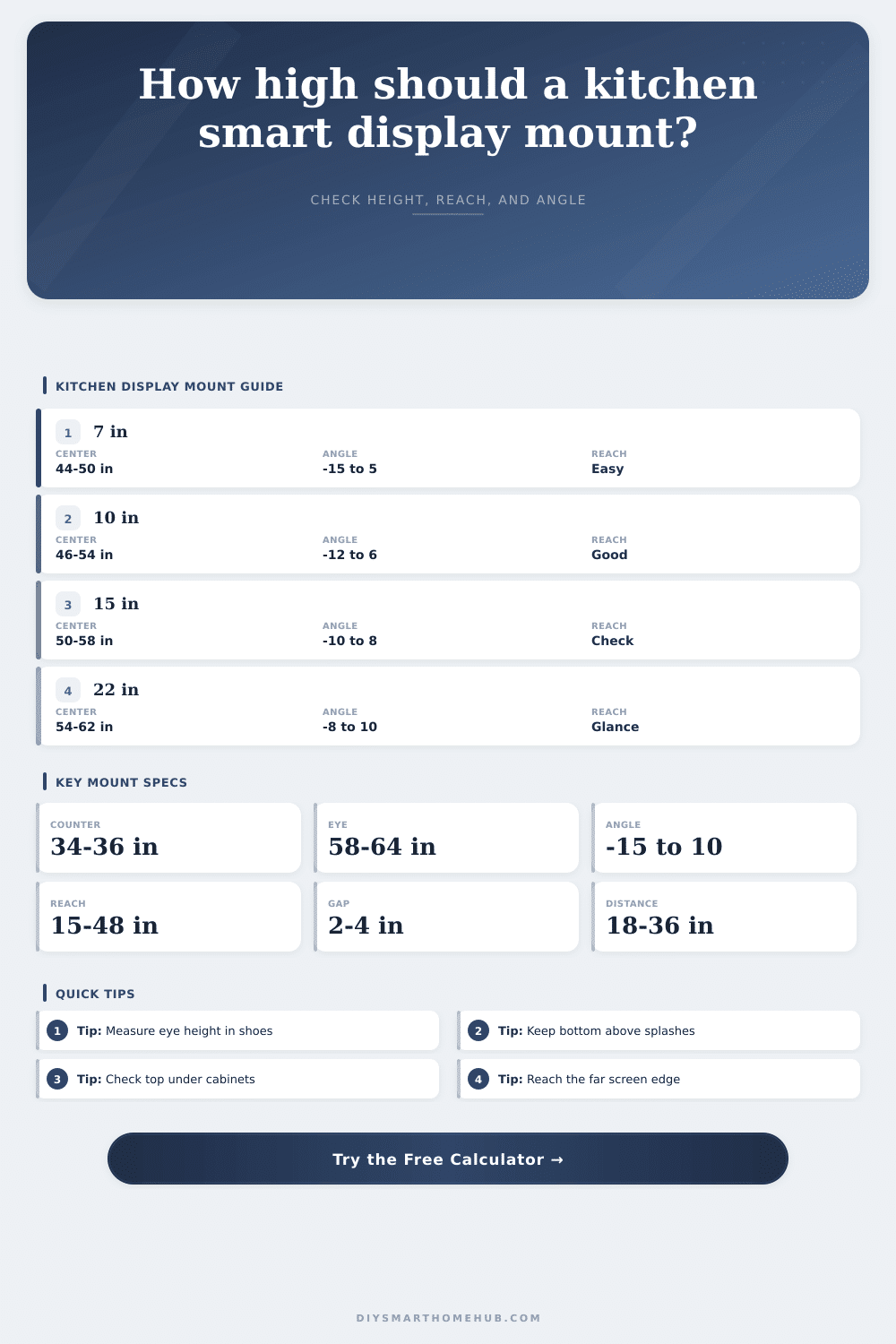
| Counter stand | 42-50 in floor height | 6-14 in above counter | 7-10 in | Usually easy to reach, more splash exposure. |
| Backsplash wall | 46-55 in floor height | 10-19 in above counter | 8-12 in | Good recipe height when top clears cabinets. |
| Under-cabinet rail | 48-56 in floor height | 12-20 in above counter | 7-10 in | Watch upper clearance and screen tilt. |
| Side wall dashboard | 54-62 in floor height | May ignore counter | 12-22 in | Better for glance use than deep touch workflows. |
| Accessible counter | 38-48 in floor height | 6-14 in above lower counter | 7-12 in | Use the exact seated eye and reach measurements. |
| Touch posture | Practical reach | Comfortable height band | Use for |
|---|---|---|---|
| Short counter reach | 20-26 in | 34-58 in | Standing close to the counter edge. |
| Standard counter reach | 26-32 in | 32-64 in | Most recipe and home-control taps. |
| Deep counter reach | 32-38 in | 36-62 in | Island or appliance-adjacent displays. |
| Accessible forward reach | 15-25 in | 15-48 in | Lower touch zones and seated use planning. |
It’s here. It is in your kitchen. You have a drill in one hand and a fancy new screen in another (worth more than your first car). You want recipe instructions to scroll across as you dice onions. But you don’t want to get your screen wet if hot oil spits out of the frying pan.
Here is where geometry step in and our intuitions fail us. For most of us, this means we hang screens at eye level, because it seems natural… until ten minutes into cooking and you find yourself in pain from craning your neck or stooping. Eye level isn’t the issue alone. It’s your hands, the way they moves around the counter-space in-between them and your eyes.
How to Mount Your Screen in the Kitchen
Once you plug your measurements into the calculator above, which does all the math for you so there’s no need to guess at any angles or reach zones, you’re set. The one thing most people gets tripped up by here is eye height. That sounds simple enough, until you realize you take the measurement with your shoes on, or maybe without, depending on whether or not you cook barefoot. A 3” difference in shoe height make a big difference in the ideal center point.
Mounting the screen too high means you has to crane your neck to read the timer. Mounting it too low makes you stoop down for no reason. The tool will calculate exactly the right center height based off where your eyes naturaly fall as you stand normally at the counter. It’s such a subtle tweak, but it is the difference between something that feels like an intrusion and something that feels part of its environment.
Speaking of which, there are splashes. Kitchens, well they’re wet places, you know? Steam rises, oil travels in unexpected patterns, and water arcs in ways that can’t be easily predicted. You want some space down from the screen to keep it from getting hit by accidental sprays. The calculator will check that backsplash clearance (taking into account both your cabinet heights and your counter heights). It’ll make sure it’s high enough so no one accidentally sprays it, yet low enough so nobody runs into the top edge when reaching up under an upper cabinet.
That vertical sandwich of limitations can leave you with very little wiggle room. Two inches sounds like plenty; until you’ve tossed a potful of sauce around a bit more vigorously. The tool alerts you of those dangers ahead of time, saving you the cost of patching the drywall.
Another physical empathy factor is touch reach. You don’t stare at the screen, you’re probably clutching a whisk in one hand and using the other to tap at it, fingers all greasy. And you have an acceptable swing radius for your arm. When the center of the screen are beyond that arc, you find yourself reaching in to touch it. Then you take a step back to see what you touched and step forward again which disrupts your flow.
The model looks at the distance between the countertop edge and the mount, along with where your shoulders pivot. It then calculates if there is enough usable space within arm’s reach while you are cooking. Looking good on a wall means nothing when the edges of the big display sits outside of arm’s reach. The diagonal size isn’t as important than aspect ratio. For example, a widescreen monitor with the same diagonal will need more horizontal clearance than a tall tablet (which has a similar diagonal). These ratios is used to solve for the actual physical height and calculate your required clearance to match.
It also accounts for viewing angles. Staring upwards can be tiring; it’s better to look slightly downwards, where you’ll have an easier time keeping your eyes focused. To keep your head in a neutral position, the calculator recommends a target angle which should reduce eye strain after hours of cooking.
Alongside those is a set of reference tables that include some handy bands for typical configurations, such as big family boards or compact counter hubs. Those aren’t rigid guidelines, but they are a starting point, a way to see what kind of relationship various display sizes has to typical kitchen spaces. A seven-inch screen can easily be placed lower down without feeling strange; a twenty-two-inch dashboard must go high enough to not crash into your head. And then the tool measures your situation against them and gives meaning to the numbers it spits out.
In the end, attaching any smart display is all about predicting how annoying it’ll be later on. Drill once and forget it. The screen should of become a natural part of the kitchen’s flow instead of getting in the way. It needs to be dry, clean, and out of sight, yet within easy reach of your hands or at your natural eye level. Measure twice, calculate once, and then go with it. When that oil hits the pan, both your screen and your neck will thank you.