Smart Lock Auto-Lock Delay Calculator
Balance security, door-close sensor grace, household traffic, unlocked exposure minutes, and battery wake cycles before choosing a smart lock timeout.
⚙Presets
🔒Lock Timing Inputs
Each profile carries a starting timeout range and expected wake load.
Count keypad, app, fingerprint, and manual unlock entries.
Include exits where the bolt remains retracted until auto-lock runs.
Temporary PINs and delivery unlocks add traffic events.
Time from unlock to a reliable closed sensor state.
Close-sensor mode exposure uses door-open time plus this delay.
Grace should be longer than normal door-open time.
Unlock, sensor close, motor relock, and status report often total 3-6 wakes.
Use a lower budget for small batteries or cold entryways.
Calculation Breakdown
📊Smart Lock Timing Specs
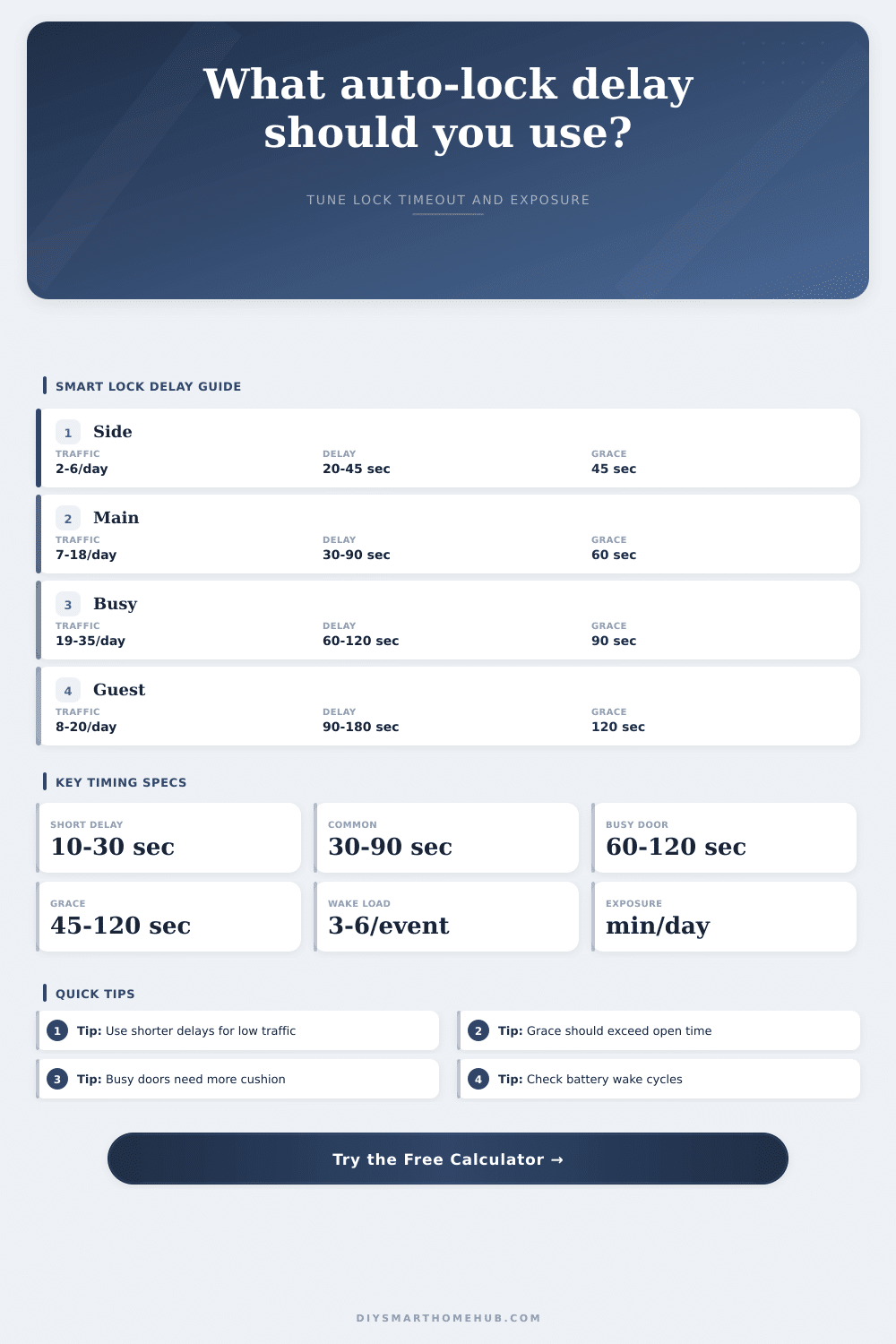
⏱Timeout Range Table
| Door Type | Typical Traffic | Delay Range | Grace Target | Best Use |
|---|---|---|---|---|
| Quiet side door | 2-6 events/day | 20-45 sec | 45-60 sec | Fast secure relock |
| Main entry | 7-18 events/day | 30-90 sec | 60-90 sec | Normal household flow |
| Busy family entry | 19-35 events/day | 60-120 sec | 90-150 sec | Repeated short trips |
| Guest or delivery | 8-20 events/day | 90-180 sec | 120-180 sec | Slow close and handoff time |
🚪Traffic Exposure Examples
| Scenario | Events/Day | Open Time | Delay | Exposure/Day |
|---|---|---|---|---|
| Low traffic side door | 4 | 15 sec | 30 sec | 3.0 min |
| Typical front door | 13 | 22 sec | 60 sec | 17.8 min |
| Busy family entry | 28 | 35 sec | 90 sec | 58.3 min |
| Guest suite door | 12 | 45 sec | 150 sec | 39.0 min |
🔋Battery Wake Cycle Table
| Events/Day | Wakes/Event | Wake Cycles/Day | 180-Cycle Budget | Signal |
|---|---|---|---|---|
| 6 | 3 | 18 | 10% | Light |
| 15 | 4 | 60 | 33% | Normal |
| 30 | 5 | 150 | 83% | High |
| 45 | 6 | 270 | 150% | Reduce wakes |
✔Door Sensor Grace Table
| Average Open | Grace Setting | Cushion Formula | Cushion | Timeout Range |
|---|---|---|---|---|
| 18 sec | 45 sec | 45 - 18 | +27 sec | Good for short delay |
| 32 sec | 60 sec | 60 - 32 | +28 sec | Good for main entry |
| 55 sec | 90 sec | 90 - 55 | +35 sec | Good for busy entry |
| 110 sec | 90 sec | 90 - 110 | -20 sec | Raise grace first |
📝5+ Column Comparison Grid
💡Timing Tips
You installed a smart lock because you don’t want to have to fish out your keys when dropping off groceries. You also want a balance between security and power consumption so your battery doesn’t die too fast, but there’s a hidden cost to that convenience. There’s this little motor inside your deadbolt. It has to extend or retract the bolt, scan sensors, then go back to sleep again. And each of these motions suck away your battery.
Set the auto-lock delay too short and you might be leaving as the lock slams behind you. Too long and you leave door wide open for anyone to just come in. And your battery runs down by Tuesday. It’s a balance between power consumption, security and comfort. To determine that sweet spot, plug it into the above calculator. It’ll do the math for you.
How to Set Your Smart Lock Timer
First, choose a door profile. We start there because a front entry door is very different from a side yard door where only dogs come and go (or maybe you make a quick trip to put out the trash). Based off that profile, the timer delay calculator recommend a beginning number for your delay timer. For most main entries, it’s going to be in a thirty to ninety second window. That should of been plenty of time to get inside, drop off package, and close door behind you, no panic required!
If you have a particularly busy family entrance where everyone just comes and goes all day, consider adding a larger buffer of even two minutes if there are kids who dawdle in the doorways or if someone likes to linger awhile. So now that you’ve chosen the profile, it’s time to tally up the number of events that actualy cause the lock to be engaged. Not everyone who comes into your house will do so by entering a code on your keypad. You also has to consider people who unlock the door without using a code and leave it unlocked before the timer starts.
There are three children racing out the door in the morning. That’s three events that trigger the motor cycle. Guest codes and deliveries add up quickly, every event causes multiple wake cycles for the battery. The battery wakes up to see if the lock is open. Then it wakes again when sensor senses the lock has been closed. It wakes yet again to secure the bolt. This is surprisingly inefficient. This is why tracking traffic over time are such an important factor.
From this, the tool will calculate your total exposure time (i.e., how many minutes per day does your door stay unlocked?). That’s how long you are technically exposed and at risk. Ideally from a security view, this number should be as low as possible. But to get zero exposure, you would set the delay so low you’d lock yourself out, which is counterproductive. You don’t want to sacrifice usability while minimizing exposure. The calculator makes this tradeoff very clear.
If your exposure looks too high, then you have two options: make the delay timer shorter OR try to access events less often if you can do that. The other hard constraint is battery life. Smart locks typically require standard batteries with a life of several months, not days. You have a budget on waking cycles per day which the calculator includes in its calculations. If your estimate falls above this budget, you’ll be changing batteries constantly.
This occurs more quickly in cold environments, as both alkaline and lithium types slows in cold temperatures. To conserve battery life, you may have to reduce the frequency of checks/delay status reports. It is sometimes better to save a few seconds of real-time tracking if it means the lock lasts for 6 months instead of only 6 weeks.
The worst offender here, where folks mess up the most. Is sensor grace period. Grace period is basically a way to tell the lock how much time to wait between unlocking and beginning to look for the door to close. Set this number too low, and the lock will think the door’s closed while the door is still swinging open. You’ll hear that annoying mechanical error sound, the lock trying to extend but finding its path blocked by the still-open door.
Always make sure your grace period is greater than your typical time spent entering/leaving. Give yourself a half-minute (or more) of cushion, it saves your motor from unnecessary strain and keeps the lock from falsely locking itself.
Finally, the idea of getting the timing right on a smart lock is more about anticipating people’s habits than keeping something from being opened. When do you put down things? When are you distracted? Who lets whom into the home first? The page’s reference table helps you set an initial range based on typical times for various doors, but expect to tinker around with these settings after some time, since you’ll start seeing what your household does in practice. Use conservative guesses initially, monitor the battery life and then fine tune accordingly. A properly tuned lock should feel like it isn’t even there… except when you want it.