Ethernet Cable Run Distance Limit Calculator
Check whether a copper Ethernet run stays inside the channel limit for its cable category, target speed, patch leads, and PoE load.
🎯Real run presets
📏Cable and channel inputs
🔌PoE power inputs
Run check results
📊Key copper Ethernet limits
🖧Category, speed, and distance reference
| Cable category | Common frequency | Supported speed at 100 m channel | Short-run high-speed note |
|---|---|---|---|
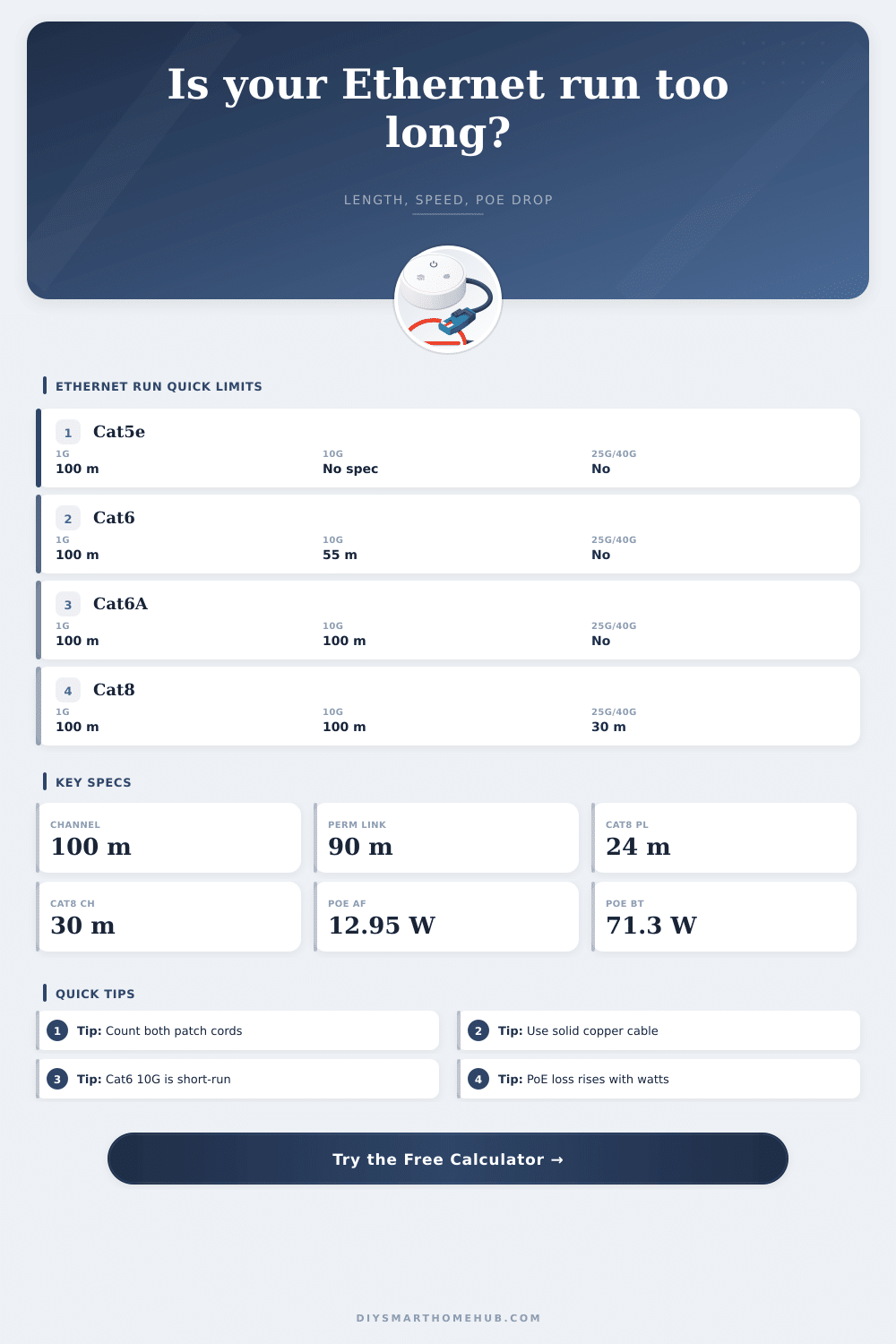
| Cat5e | 100 MHz | 100 Mb, 1 Gb, often 2.5 Gb | Not a 10GBASE-T 100 m cabling choice. |
| Cat6 | 250 MHz | 100 Mb, 1 Gb, 2.5 Gb, 5 Gb | 10GBASE-T is typically limited to 55 m channel. |
| Cat6A | 500 MHz | 100 Mb through 10 Gb | Preferred full-channel copper choice for 10GBASE-T. |
| Cat8 | 2000 MHz | 10 Gb and lower at 100 m | 25GBASE-T and 40GBASE-T use 30 m channel, 24 m permanent link. |
🔋PoE class reference
| PoE type | PSE power class | Guaranteed PD power | Voltage-drop sensitivity |
|---|---|---|---|
| 802.3af Type 1 | 15.4 W | 12.95 W | Usually forgiving on normal home runs. |
| 802.3at Type 2 | 30 W | 25.5 W | Check long 24 AWG and warm cable bundles. |
| 802.3bt Type 3 | 60 W | 51 W | Four-pair delivery is expected for full power. |
| 802.3bt Type 4 | 90 W | 71.3 W | Patch cord gauge and channel length matter a lot. |
🧮Worked smart-home run examples
| Scenario | Typical channel | Common cable | What to watch |
|---|---|---|---|
| PoE doorbell or wall tablet | 20 to 45 m | Cat5e or Cat6 | Low power, but slim patch cords can add drop. |
| Outdoor 4K PoE camera | 45 to 90 m | Cat6 or Cat6A | IR heater watts and attic heat raise loss. |
| Ceiling Wi-Fi 6/7 access point | 20 to 80 m | Cat6A | 2.5G/5G plus PoE+ or bt power. |
| 10G NAS or office jack | 15 to 100 m | Cat6A | Cat6 may fail 10G beyond the short-run allowance. |
💡Calculation notes
Maybe you’ve heard: “Ethernet cables don’t go farther than 100 meters.” That’s an easy rule of thumb and not too far off the mark. Reality is slightly more complicated. Long cable runs suffers signal loss due to nature of copper wire. When running long distances, you experience voltage drop, signal loss and crosstalk which can impact your connection.
This page includes a handy calculator for checking if your exact setup will succeed (or fail, but quietly). So now you won’t guess at whether something might work… You’ll know.
Why 100 Meters is Not Always Enough
Remember that 100 meters refers to the whole channel, including all copper from one port to another. Any copper in use form part of the channel. This includes wire running through the wall, the patch cord going from the wall to the switch, the patch cord running from the switch to your device, and any additional loops. Most folks will calculate length of permanent link and think they are within limit. Often they aren’t. Even with a 90 meter permanent link in their wall and adding two three-meter patch cords, they’ve exceeded standard. Before their equipment is even powered on they’ve used up there performance margin.
Cable does change things dramaticly though. Cat5e can supports gigabit speeds out to one hundred meters, but not much above that on the frequency side. Cat6 has some headroom, but then you’re limited to ten-gigabit speeds over a shorter distance, typically about fifty-five meters. How does your particular mix stack up against those? That’s what the calculator displays.
A link may light up, but it may not hold under an intense data load. Load stability is every bit as critical as getting connected in the first place.
Many installers don’t think about PoE (power over ethernet) until their devices dies during inclement weather. Copper loses energy to resistance; the colder it gets the greater the resistance due to length. This results in voltage drop; always an issue. To be effective, any device require a certain amount of voltage. You must think carefully about high-power devices such as PTZ cameras or Wi-Fi 6 access points. The higher the power demand, the more critical this is.
The thickness of your patch cords is also important. Twenty eight-gauge patch cord are very thin and will cause too much voltage drop, which results in unecessary reboots. A higher gauge means thicker copper can carries more current without losing as much voltage.
Other factors are subtle; things like temperature. Hot copper is less conductive; it’s more resistive. So cables in that closed-in server closet or the attic with all its sunlight will actualy be shorter than their rated lengths. Because that heat adds actual electrical resistance, the tool takes that into account. Even tight grouping of cables trap heat and multiplies alien crosstalk, further hurting signal quality. Sure you’ll make your one-hundred-meter limit on paper. But crowded and hot isn’t good for performance. Even if length is fine, the heat lowers the quality of connection. These are things to think about when selecting the proper configuration.
Don’t just get most inexpensive cable. Where is it going? What type of traffic will run on that cable? How far will it need to go? A short run with high power needs might be better served by thicker gauge wire then a long run carrying only low-power sensors. The table below lists possible combinations that would of worked based off speed and category. Use this as a guide to determine what works best for your application.
Network cabling is about building in enough margin to handle real-world conditions. It’s not about hitting exact numbers. The minute you grasp that gauge matters for power, you stop guessing. You also need to know that heat increases resistance and a channel include all components. You start designing with precision.
The next time your devices work properly even on a hot summer afternoon, you’ll know you’ve got it right.