UPS VA to Watts Calculator
Convert UPS VA rating and power factor into usable watts, compare your connected load with surge allowance, estimate battery runtime, and see how much headroom remains for smart home equipment.
⚡UPS load presets
⚙Calculator inputs
UPS VA to watts results
📊UPS/PF spec grid
📋UPS reference tables
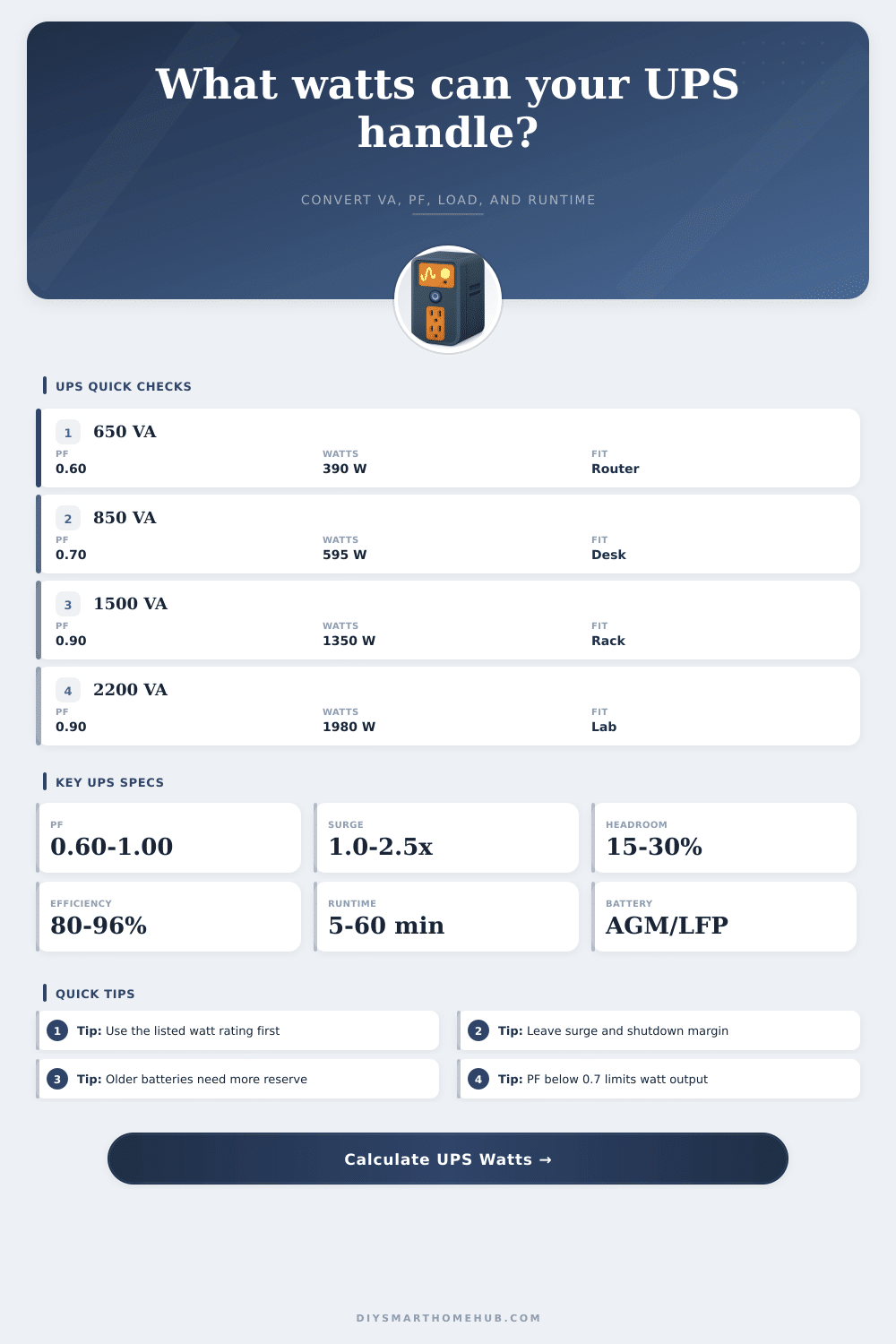
| UPS VA class | PF range | Typical watts | Common smart home load |
|---|---|---|---|
| 425-650 VA | 0.55-0.65 | 230-420 W | Router, ONT, small switch |
| 850-1000 VA | 0.60-0.80 | 510-800 W | Mesh, light PoE, small NAS |
| 1350-1500 VA | 0.60-0.90 | 810-1350 W | Desk, NAS, camera switch |
| 2200-3000 VA | 0.80-1.00 | 1760-3000 W | Rack UPS or larger automation panel |
| Power factor | VA to watts formula | 1500 VA output | Planning note |
|---|---|---|---|
| 0.60 | VA x 0.60 | 900 W | Common value on budget standby units |
| 0.70 | VA x 0.70 | 1050 W | Useful for midrange desktop UPS labels |
| 0.80 | VA x 0.80 | 1200 W | Often seen on better line-interactive units |
| 0.90 | VA x 0.90 | 1350 W | Common for higher-quality 1500 VA models |
| 1.00 | VA x 1.00 | 1500 W | Unity PF is usually listed clearly |
| Battery type | Usable factor | Best runtime load | Calculator use |
|---|---|---|---|
| Sealed lead-acid AGM | 0.78 | Light to moderate | Default practical derating |
| High-rate lead-acid | 0.82 | Short, high-current backup | Slightly better at UPS discharge rates |
| Gel lead-acid | 0.74 | Gentle loads | Conservative for high-rate UPS use |
| LiFePO4 | 0.90 | Longer cycle life | Higher usable energy estimate |
| Aged lead-acid | 0.55 | Replacement warning | Models older packs with reduced capacity |
| Runtime class | Typical battery Wh | Runtime intent | Smart home example |
|---|---|---|---|
| Compact desktop | 80-120 Wh | Bridge short outages | Router and modem only |
| Standard 1500 VA | 180-250 Wh | Shutdown window | NAS, router, small switch |
| Small rack UPS | 350-550 Wh | Longer network holdover | PoE cameras and controller |
| External battery | 900-1500 Wh | Extended outage support | Network rack and storage |
| Long-runtime home | 1800+ Wh | Multi-hour backup | Critical automation and internet |
🧮Formula and sizing table
| Check | Formula | Use | Good target |
|---|---|---|---|
| VA to watts | Watts = VA x PF | Turns apparent power into real output power | Use listed watt rating if lower |
| Surge load | Load watts x surge factor | Checks startup and simultaneous switching demand | Below UPS watts |
| Headroom | (UPS watts - surge load) / UPS watts | Shows remaining output margin | 15% to 30% |
| Usable battery Wh | Battery Wh x type factor x efficiency x reserve | Converts battery size into practical runtime energy | Keep reserve above 10% |
| Runtime | Usable Wh / runtime load watts x 60 | Estimated backup minutes | Enough for shutdown or outage goal |
💡UPS sizing tips
This calculator is for UPS planning and load screening only. Always follow the UPS nameplate, manufacturer runtime chart, battery replacement guidance, electrical ratings, and local safety requirements.
You purchase a router. You plug it in. You plug in a UPS. You think that you’ve purchased three hours of backup time. It’s 2AM when the outage occurs. Lights go off, but you still have internet! For four minutes. Then it all goes dark. Why?
Most folks purchase Uninterruptible Power Supplies (UPS) based off Volt-Ampere ratings, but they use Watts to power their devices. They are not the same thing. Your device consumes watts; your UPS provides volts and amps. Where the two differ, your battery time dissapears. So what’s the deal? This is the power factor. This term describes how effectively your UPS take stored electricity and turns it into juice your equipment needs.
Why Your UPS Does Not Last as Long as You Think
For example, a lower end standby might be rated at.60. So only sixty percent of its VA rating are actually watts. For instance if you purchase a 1500 VA standby unit, you really have 900 watts to work with. You think your monitor and desktop won’t even make a dent in the power draw. But you think you’ve got plenty of space. No you don’t.
Once you input your units specs into calculator above (it figures out all the numbers for you), you’ll never guess again about overloading your backup system by pulling too much juice. Capacity is one thing; runtime’s another. And both are far more misleading than they appear. The runtimes published by manufacturers presume ideal conditions. In real life, we have heat, aged batteries, and inefficiencies in the inverter circuitry.
At high drain levels, a lead-acid battery also sags in voltage and has significant internal resistance, which causes its effective capacity to drop. This is called the Peukert effect, but you don’t need to understand the physics to experience the sting: That same battery that keeps your modem running for half an hour will likely keep it running for just a dozen if you throw a NAS drive into the mix. The tool lets you choose your battery chemistry and apply a usable energy factor to account for this. It also warns you that if you want your server to graceful shutdown instead of crashing during a write cycle, you can’t get away with anything less than 20 percent reserve.
The other silent killer is surge current. When electronics wake up from sleep or first come online, they pulls much more power for that brief moment. External hard drives and PoE switches are infamous for this behavior. That startup spike will blow the breaker if your continuous load is already maxed out on your UPS. You want some headroom. Enough so you can run the devices, sure, but also so you can handle their bad days.
Most planners recommend leaving fifteen to thirty percent capacity unused as a buffer against unexpected loads and component aging. It also helps preserve battery life by ensuring inverter doesn’t have to operate at max efficiency while the lights are out, which reduces heat generation too. New batteries don’t lie as much as old ones. A three-year-old sealed lead acid pack may read “full” on your multimeter, but only provide half its rated capacity when tested under load. Experience tells us age lowers performance beyond what the voltage reading indicates, which is why we have an option in the calculator for aging packs.
Lithium iron phosphate changes all of this with their flat discharge curve and higher usable energy amount, but at higher initial cost. You get the picture: You pay once for known runtime, or multiple times with unexpected outages and battery replacement cycles. For those who’ve set up routers and such before, the reference tables included with the tool list common scenarios ranging from basic configurations through fully equipped network racks. Use these to check your calculations. If your number is twenty minutes but the table shows sixty minutes, double-check your assumptions about how much power the device will use. Chances are you’re underestimating its surge demand and/or overestimating the efficiency.
If the power goes out and you lose your connection, there is no point in having a “smart” home in the first place. Sizing properly avoids that heartbreak. Ignore the big VA number on the box. Look at the little watts number beside it. That’s what you’re capable of running. It is just marketing stuff. Plug it into the tool to check your configuration. Leave a margin of error. Sleep better knowing your stuff works when the grid doesn’t.
The theoretical maximum run time shouldn’t of been the goal. Reliable up-time in real life is.