Mesh Network Device Capacity Calculator
Estimate safe device count, airtime pressure, backhaul bottlenecks, hop loss, wired-node benefit, room complexity, and mesh headroom before adding cameras, streamers, sensors, or work devices.
📍Mesh capacity presets
⚙Mesh and client inputs
Capacity breakdown
📶Mesh spec grid
📊Backhaul and client reference tables
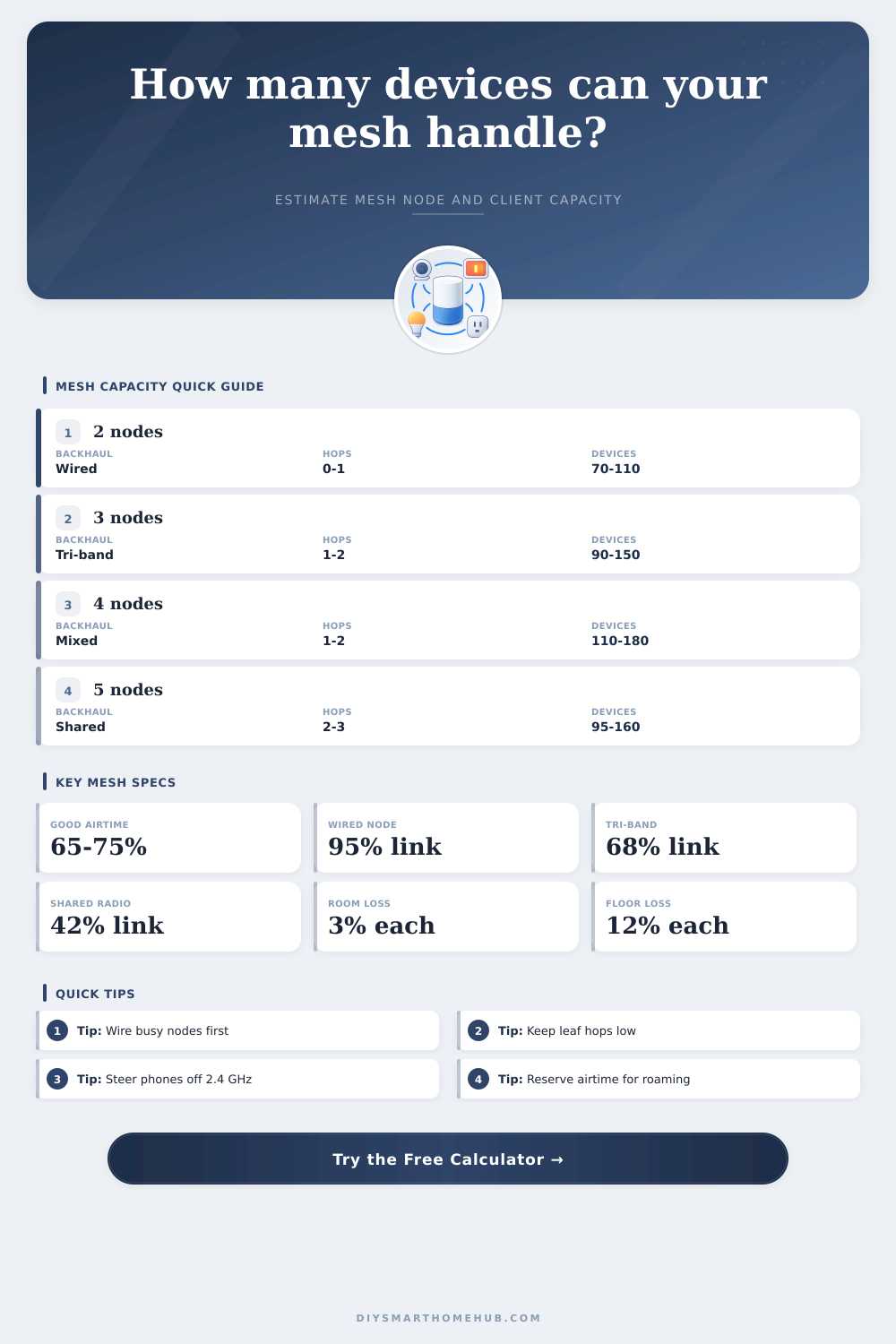
| Backhaul type | Effective link factor | Hop penalty | Best use |
|---|---|---|---|
| All nodes wired | 0.95 | 3% per hop | Highest capacity and lowest mesh relay load |
| Mixed wired and wireless | 0.74 | 13% per hop | Good retrofit when one or two remote nodes can be wired |
| Dedicated wireless backhaul | 0.68 | 16% per hop | Tri-band mesh with a separate relay radio |
| Shared wireless backhaul | 0.42 | 28% per hop | Light homes, low camera count, short leaf chains |
| Client group | Airtime weight | Typical band | Capacity note |
|---|---|---|---|
| IoT sensors and plugs | 0.25 device units | 2.4 GHz | Low throughput, but too many can crowd beacons and association tables |
| Phones, tablets, laptops | 1.00 device unit | 5 GHz or 6 GHz | Balanced traffic with bursts from updates, calls, and browsing |
| TVs, speakers, consoles | 1.70 device units | 5 GHz | Streaming and gaming increase airtime during evening peaks |
| WiFi cameras and doorbells | 2.80 device units | 2.4 GHz or 5 GHz | Continuous upstream video is often the mesh capacity limiter |
| Node class | Base active clients | Radio capacity index | Planning role |
|---|---|---|---|
| WiFi 5 dual-band mesh | 28 per node | 450 | Light apartments, low camera count, fewer simultaneous streams |
| WiFi 6 dual-band mesh | 45 per node | 650 | Mainstream homes with phones, laptops, and moderate IoT |
| WiFi 6 tri-band mesh | 68 per node | 1050 | Busy homes where wireless backhaul should not share every client radio |
| WiFi 6E tri-band mesh | 84 per node | 1450 | High-capacity clients near nodes plus cleaner 6 GHz spectrum |
| WiFi 7 tri-band mesh | 110 per node | 2200 | Dense device homes, faster clients, and stronger backhaul margin |
| Home pattern | Suggested nodes | Backhaul target | Capacity watch item |
|---|---|---|---|
| Apartment or single-floor condo | 2 nodes | 0 to 1 wireless hop | Avoid oversplitting small spaces into too many cells |
| Two-floor townhome | 3 nodes | Wire one floor if possible | Floor loss and stairwell placement affect leaf hops |
| Large detached home | 4 to 5 nodes | Mixed or wired | Camera load and rooms per node can outrun coverage needs |
| Home office plus smart home | 3 to 4 nodes | Wire office node | Video calls need steady airtime headroom at peak hours |
💡Mesh capacity tips
Your home network handles your life. The box told you it would cover from the basement to the front porch seamlessy. It only took ten minutes to install. You felt good when the app went green.
And then there was Tuesday night. Everybody were on a video call, and your streaming sticks churned out 4K movies, and your phone dropped signal next to the kitchen.
Why Your Mesh Network Is Slow and How to Fix It
You didn’t buy bad gear. You bought more radios than your airtime can support. Mesh networks aren’t magic wands; they’re constrained systems in which each wireless hop rob bandwidth away from your actual devices. While the calculator do all the math for you (above), knowing what it penalizes shifts your thinking about planning your network.
For most folks, we think of things as devices: one per item in our cart, like groceries. There are ten sensor. There is one laptop. There is one phone. Done. A 4k camera guzzles data, but a smart sensor sips it. And the tool weights different client types accordingly. Twenty silent temperature monitors consume significantly less airtime then one doorbell spitting out a continuous video stream.
There is also problem of the sustained load. It’s not just about association counts. So when you get the results showing safe device capacity dropping, that means your backhaul is choked with that high-bandwidth stuff. Most of those mesh deployments die silent from backhaul.
A mesh network share radios for the wireless relays. If a node use half its radio power to talk to the main router, it has half left for your phone. It’s not a bug, that’s just the way wireless works. Eliminate that penalty entirely by wiring at least one (or two) nodes back to the switch. This is laid out in the reference table on the page, which shows that even with dedicated wireless links, there are still large efficiency penalties over Ethernet. Don’t need every node wired? Massive gains can be seen anyway, but if the busiest leave(s) wired, then all the difference.
Depth is another quiet assassin. Throughput drop and latency increases with each wireless hop. Your traffic might pass through three radios before reaching the internet; your bedroom node connect to your living room node, and that connects to the main gateway. It’s not just about signal strength. With multiple levels, airtime fairness is crucial. Keep leaf nodes within one or two hops of the root. This ensures headroom for bursty traffic such as software updates and roaming. The tool models this by tuning capacity based off average hop counts.
Surprisingly, Band steering also come into play. Dumber mesh systems cheaply throw everything onto the 2.4 GHz band, which penetrates walls further. Bad idea! That’s slower and more clogged. Great steering moves capable devices to 5 GHz (or even 6 GHz) while leaving the low band free for IoT gadgets that has no choice but to stick there. Reducing contention on the busy bands increases effective capacity, which is why better steering helps.
It’s about both the rooms and the floors. Signal gets absorbed by walls. Devices has to resend the transmission. More retries mean less time sending actual data. Repeat after me. Repeats means less time on the actual signal. Is the concrete thicker? Multiple floors? Is your house not centrally laid out? You’re going to need more nodes for good signal, and that will cause confusion among too many node.
There’s got to be a balance between density and coverage. Not enough nodes and there are dead zones. Too much, it’s an interference storm. Yes, wired backhaul is still king of the hill for good reason. It takes that relay load off the airwaves completely. Whenever possible, wire things up. During renovations or even retrofits, go wired. When the in-laws come for the holidays and everyone want to watch something on TV at once, you’re going to be glad you did.
The mesh handles the connections. You worry about the capacity. Focus on places where demand is greatest. For example, wire the office node in which people do work. Put camera nodes near their cameras so that hop distances are small. Test your scenarios using the tool and purchase additional hardware only when needed. In fact, you may discover that replacing one wireless node with a wired connection provides greater capacity then purchasing two new ones. Plan, don’t patch.
Back to Tuesday night. When you know for sure how much time you have on-air and plan it correctly, your network is no longer dropping calls; it’s getting you through life. And all those green lights on the app should of actualy mean what they say. It means ready, not connected.