🤖 Roomba 960 Battery Life Calculator
Estimate your Roomba 960 runtime, cleaning cycles, and recharge time based on your home setup
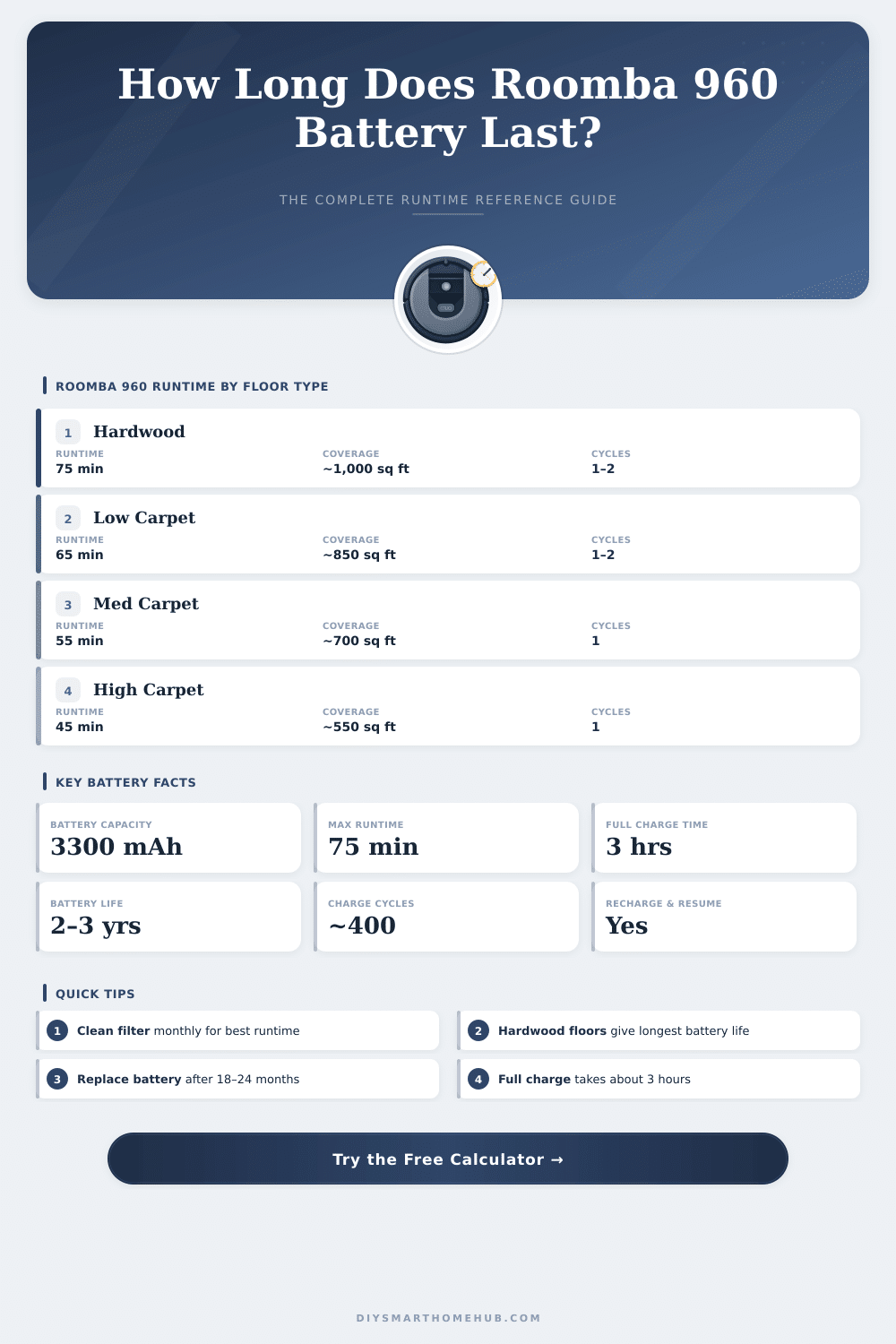
| Floor Type | Avg Runtime | Coverage (sq ft) | Coverage (m²) | Motor Draw |
|---|---|---|---|---|
| Hardwood / Tile / LVP | 75 min | ~1,000–1,200 sq ft | ~93–111 m² | Low |
| Low-Pile Carpet | 65 min | ~800–1,000 sq ft | ~74–93 m² | Medium |
| Medium-Pile Carpet | 55 min | ~650–800 sq ft | ~60–74 m² | Medium-High |
| High-Pile / Thick Carpet | 45 min | ~500–650 sq ft | ~46–60 m² | High |
| Mixed (Hardwood + Carpet) | 60 min | ~750–950 sq ft | ~70–88 m² | Varies |
| Battery Age | Approx Capacity | Runtime (Hardwood) | Runtime (Med Carpet) | Cycles Used |
|---|---|---|---|---|
| 0–6 months (New) | 100% | 75 min | 55 min | 0–60 |
| 6–18 months (Good) | 85–95% | 64–71 min | 47–52 min | 60–180 |
| 18–30 months (Aging) | 70–85% | 53–64 min | 39–47 min | 180–300 |
| 30+ months (Degraded) | 50–70% | 38–53 min | 28–39 min | 300+ |
| Scenario | Area | Est Runtime Needed | Cycles Required | Recharge & Resume |
|---|---|---|---|---|
| Studio Apartment | 350–500 sq ft | 25–40 min | 1 | No |
| 1-Bedroom Apartment | 500–750 sq ft | 40–60 min | 1 | Rarely |
| 2-Bedroom Home | 800–1,100 sq ft | 60–85 min | 1–2 | Sometimes |
| 3-Bedroom Home | 1,100–1,600 sq ft | 85–120 min | 2 | Yes |
| Large Home | 1,600–2,500 sq ft | 120–180 min | 2–3 | Yes |
The Roomba 960 is an automatic vacuum that maps the whole floor of the house, remembering its position and resetting itself as needed until it ends the cleaning. Like every device that operates by Battery, it can experience problems over time. A common problem happens when the Roomba stops in the middle of a task and shows the message “Please charge the Roomba” instead of going back to its base.
That commonly happens after a year and half of usage. Some copies also have troubles with the life of the Battery and with the repetition of planned cleaning hours.
Roomba 960 Battery Problems and How to Fix Them
When the Battery starts to fail, the Roomba can stay still in one room and not find its way out. It drains more quickly, and wrong warnings appear more often. Sometimes the screen pionts that the Battery is too weak, but it never manages to reach the charger.
This really annoys.
Before buying a fresh Battery, first check the charger itself. One can use a plug with a power meter to test whether it works correctly. The charger should use at least 20 watts during the process.
Sometimes it stops and does not charge well. Moreover, some Roomba 960 models only reach 80 percent of ability. A simple reset of the Battery and of the Roomba itself can sometimes settle that problem.
About the life of the original Battery, one sample shows 90 minutes of run after 27 months of usage, with one use weekly on hard floor. This is fair, but soon you will kneed to replace it.
Several options exist for backup batteries. The lithium ion Battery of 1800mAh works for the Roomba 960 and also works with many models from the 600- and 800-series, like 614, 640, 675, 690, 805, 860, 890 and more. There are also high capacity nickel-metal-hydride ones in 4000mAh, that give more run time than the original.
For even more energy, the Cameron Breast 14.4V 5200mAh lithium-ion Battery is meant for longer use. Some users offer cells of 3300mAh, wondering if the high capacity of the 980 would help the 960 work longer.
Swapping the Battery is fairly easy. One turns the Roomba with the bottom up, so that the lid is below. Use a Phillips screwdriver size one to remove two screws of 11.4mm.
Lift the plastic cover to reach the Battery. Hold it by the two tabs on the sides and pull out. Put in the new one, replace the cover, screw back and turn thedevice back to normal.
A Battery from a third party with higher capacity can let the Roomba end full cleaning without needing to return for recharging. Choosing a reliable replacement helps to simplify everything. The lithium Battery in 4400mAh is another good option and works for both the 960 and 980.